This article will show you how to find a Medium ID, step-by-step! It might be helpful for your web or mobile application as well.
Why find your Medium ID?
Medium is an online publishing platform expert writers and with 170 million readers. The Medium ID is useful if you want to embed your Medium blog on your website.
Step-by-Step Guide
- In your web browser, go to your Medium page. For example: https://medium.com/@medium
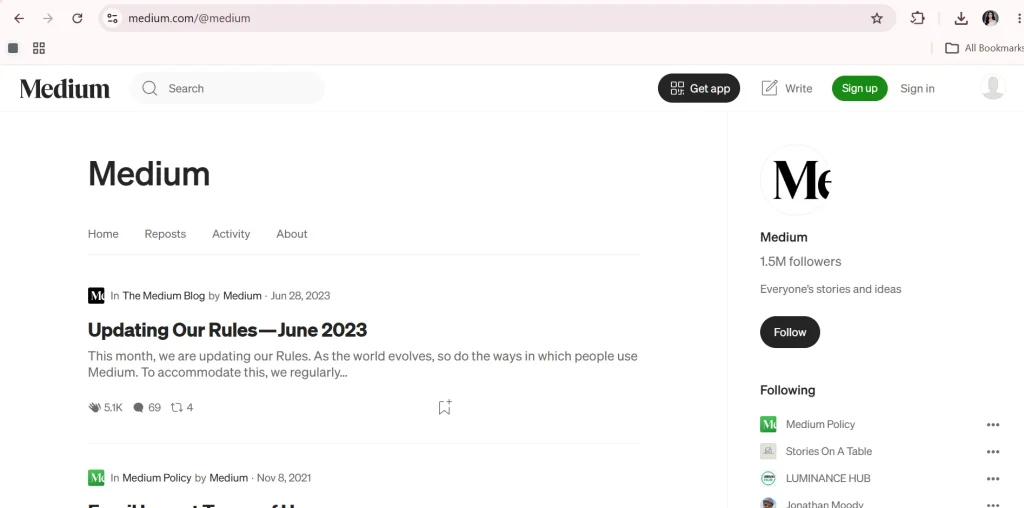
2. In the browser’s address bar, find the text after the “/”. In this example, your Medium ID is “@medium”.

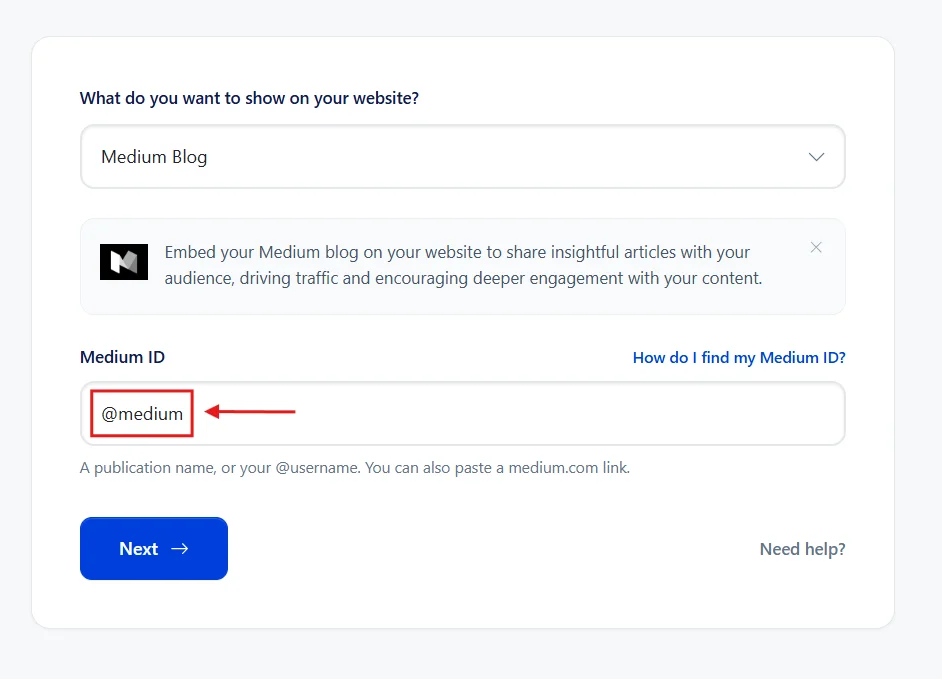
3. Copy and paste it into the Medium Blog field.
That’s it! We hope you found this page helpful. Thank you for reading our tutorial about how to find a Medium ID. Please share this post with someone who might need it.
Add Medium blogs to your website
You can add a Medium blog feed to your website for free using SociableKIT. Make a Medium blog widget to improve your site.
Want more tips?
Sign up for our weekly newsletter for great tips and ideas to make your project better. Stay updated with the latest trends and advice by signing up here.
This Should Help!
Using Medium widgets, you can make your online presence stronger. This guide makes it easy to use your Medium feeds online.
We hope you find this guide useful. Share it with friends who might need it!